Why each piece exists
① Gateway
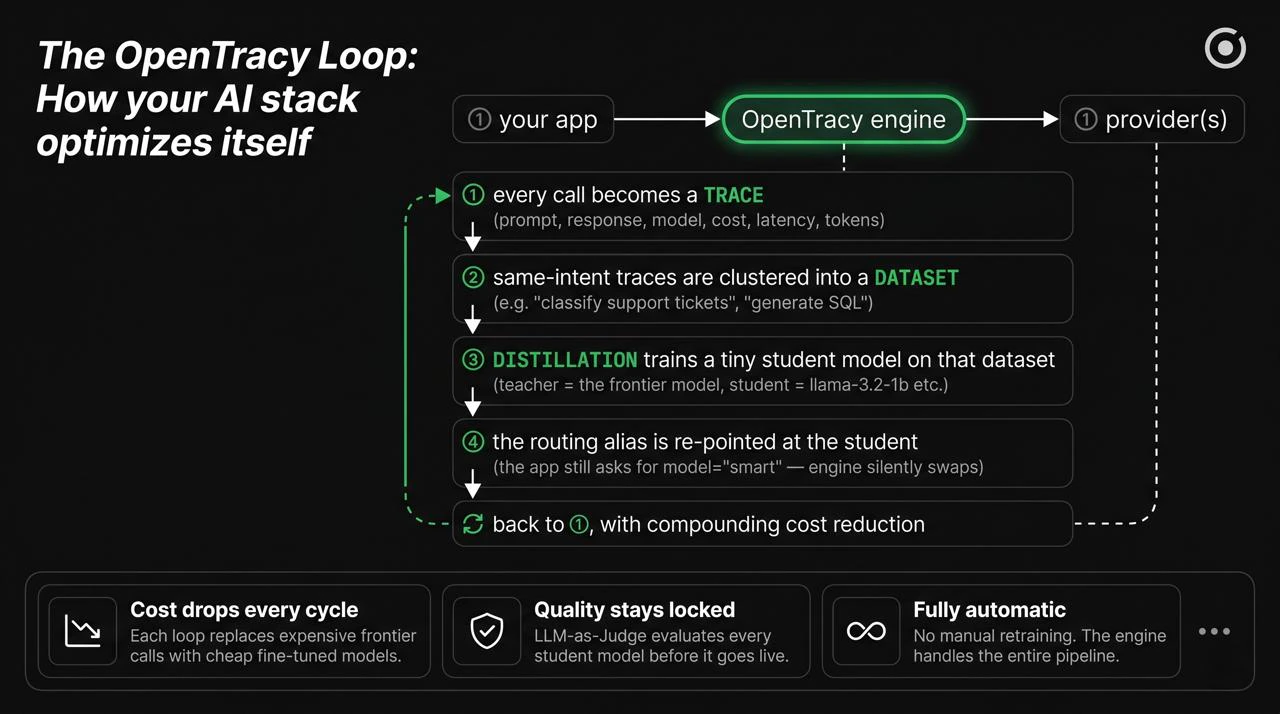
Your app needs something between it and thirteen different provider APIs. OpenTracy is OpenAI-compatible, so you point your OpenAI SDK at the engine URL and none of your code changes. On top of that, the gateway gives you retries, fallbacks, provider-level observability, and the ability to swap a model’s implementation without redeploying. Without a gateway: every new model adoption is a code change. With it: models are a routing config.② Traces
Every request the gateway handles is recorded: prompt, response, model, provider, cost in USD, latency in ms, token counts, and any metadata you attach. That’s the trace. Traces are the single asset that makes the rest of the pipeline possible — you can’t distill from data you didn’t capture. Traces are stored in ClickHouse (self-hosted) and exposed via the REST API and UI. See Traces for the schema and where they live.③ Datasets
A single trace isn’t useful. A thousand traces grouped by intent is a dataset. OpenTracy clusters traces automatically using prompt embeddings, names each cluster with an LLM (“JavaScript Concepts”, “Invoice Classification”, etc.), and lets you curate: keep the good ones, drop the hallucinations, add a judge’s verdict per row. A dataset is the bridge between “I have traffic” and “I can train something”. See Datasets.④ Distillation
Pick a teacher (the expensive model — GPT-4o, Claude Sonnet, etc.) and a student (a small open model — llama-3.2-1b, qwen3-0.6b, mistral-small). The teacher generates high-quality labels for each prompt in your dataset; the student is fine-tuned on those labels using the BOND (best-of-N distillation) loss. You end up with a small LoRA adapter that matches the teacher on your specific workload, at a fraction of the cost. This is the wedge — the thing no generic gateway gives you. See Distillation.⑤ Auto-routing + alias swap
The router picks a model per prompt based on a learned error profile per cluster. An alias (e.g.model="smart") is a logical name that the
engine resolves at routing time. When a distilled student is ready, you
re-point the alias — the app keeps calling model="smart" and its cost
drops overnight.
This is how the loop closes. See Auto-routing.
Concretely, what a week looks like
1
Day 0 — install and point traffic
pip install opentracy and change base_url in your OpenAI client
to the engine URL. Your app now flows through OpenTracy.2
Day 0 — same day, zero code changes
Every request is captured as a trace. Cost and latency per call are
visible in the UI. The auto-router is already picking cheaper models
for easy prompts.
3
Day 2–5 — auto-clustering
Traces accumulate. The engine clusters prompts by intent. You review
clusters in the UI, give them names, pick the ones worth distilling.
4
Day 5–7 — first distillation run
Submit a distillation job: teacher = your current expensive model,
student = a small open model. Training runs on your GPU (or the engine’s
GPU if you’re using a self-host with one). Output: a LoRA adapter.
5
Day 7 onward — alias swap
Point alias
smart at the distilled student. The app keeps calling
model="smart". Cost curve drops. Rinse and repeat for other clusters.What OpenTracy does NOT do (yet)
- Train from scratch. Distillation is always teacher → student fine-tuning. If you need a model from raw text, use something else.
- Handle vision or audio end-to-end. The pipeline is chat-completion shaped (messages in, messages out). Images-in-prompts work; full multimodal training does not.
- Replace your evaluation harness for novel research. OpenTracy has evaluations for “is this distilled student as good as the teacher”, not for “which of these 20 new models is best on a benchmark we just invented”.
Next
Traces
What’s captured, the schema, where it lives.
Datasets
How traces become training-ready data.
Auto-routing
How the router picks a model per prompt.
Distillation
Teacher, student, LoRA, alias swap.